
Tech Support Scam
How fake computer warnings push people to call for unnecessary help
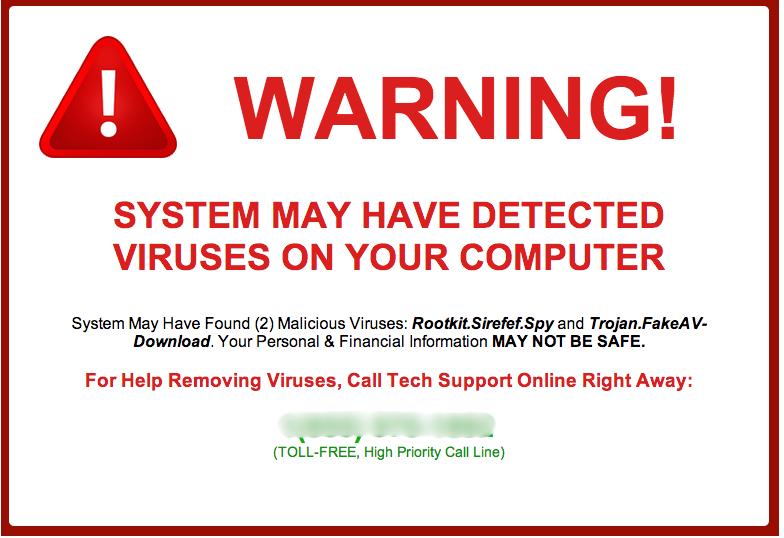
A typical tech support scam alert designed to look like an urgent system warning. These pop-ups are not real and are created entirely to cause panic and prompt a phone call.
In This Guide
Overview of the Scam
A tech support scam is a type of fraud where someone pretends to be a technology specialist - often posing as a representative from a well-known company like Microsoft or Apple - and convinces you that your computer has a serious problem requiring immediate attention. The goal is to get you to pay for help you do not need, hand over control of your device, or share sensitive personal information.
These scams typically begin with a sudden pop-up message or an alarming phone call. The warnings are designed to look official and feel urgent. They often display familiar logos, legal-sounding language, or error codes that seem technical and credible. In reality, they are entirely fabricated.
Tech support scams are among the most commonly reported scams in the United States, affecting hundreds of thousands of people each year. They work because they exploit one of the most universal anxieties in modern life: the fear that something has gone wrong with our technology and we do not know how to fix it.
How the Scam Works
The scam can arrive in several ways, but the general pattern follows a predictable path once contact is made.
- You are browsing the internet or using your computer normally when a large alert box appears on your screen. It may freeze your browser, play a loud audio alarm, and display a phone number to call immediately.
- The message claims your computer is infected with a virus, that your personal data has been compromised, or that your software license has expired. It instructs you not to turn off your computer and to call the number shown right away.
- If you call the number, a person answers - often speaking in a professional, patient tone - and confirms that yes, your computer is in serious danger. They offer to fix the problem remotely at no immediate charge, or for a small diagnostic fee.
- They ask you to install a remote access tool, which gives them the ability to view and control your computer screen. Once connected, they may show you confusing system logs or folders that they claim are evidence of an infection. These are ordinary computer processes that look alarming only if you are unfamiliar with them.
- After the fake diagnosis, they present a bill. This might be a one-time charge for a fix, a subscription to a bogus protection service, or a request to pay using a gift card or wire transfer.
- In some cases, the scammer will also ask for your banking details under the pretense of processing a refund or verifying your identity, giving them direct access to your financial accounts.
The entire encounter is manufactured from start to finish. The pop-up is not from your operating system. The person on the phone is not a technician. And your computer almost certainly has no real problem at all.
Common Variations
While the core pattern stays the same, tech support scams appear in several different forms depending on how they make first contact.
- Pop-up alerts in the browser: A webpage triggers a full-screen warning with an alarm sound and a phone number. The page may be very difficult to close, adding to the sense of urgency.
- Unsolicited phone calls: You receive a call from someone claiming to be from Microsoft, Apple, or your internet provider. They say they have detected unusual or dangerous activity on your account or device.
- Email alerts: A message arrives claiming your subscription has expired or your account has been flagged for suspicious activity, with instructions to call a number or click a link to resolve the issue.
- Search engine ads: Fraudulent ads appear at the top of search results when you look up a real company's support phone number. Calling the number in the ad connects you to a scammer, not the real company.
- Refund scams: A scammer contacts you claiming you are owed a refund from a previous tech service. They ask to access your computer to process the refund but instead attempt to steal money or personal data.
Example Scam Messages or Pop-Ups
The screenshot below shows a real example of the type of alert used in tech support scams. These messages are carefully designed to resemble official system warnings. Paying close attention to their details reveals why they are not genuine.
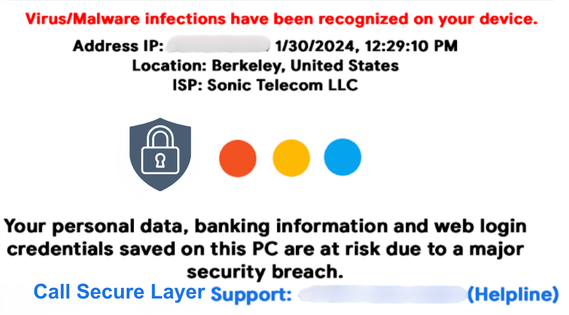
Notice the prominently displayed phone number, the urgent language claiming your computer is blocked or infected, and the logos intended to suggest the alert is coming from Microsoft or a legitimate security program. Real system warnings never ask you to call a phone number, and they never appear inside a web browser like this.
Common phrases used in these fake alerts include: your computer has been locked, your personal details are at risk, do not restart your computer, call this number immediately for Microsoft-certified support, and your IP address has been compromised. These are chosen specifically to create a feeling that you have no safe option except to act immediately.
Warning Signs
Recognizing the signs of a tech support scam can stop it before it goes any further. Take a moment to pause if you notice any of the following.
- An alert appears on your screen unexpectedly, especially one that plays a loud alarm sound or makes it very difficult to close the browser window.
- The warning message includes a phone number and tells you to call it immediately. Legitimate security alerts from your operating system never do this.
- You receive an unsolicited phone call from someone claiming to work for a major technology company, saying they have detected a problem with your device or account.
- The person on the phone or in the message creates a strong sense of urgency, insisting you must not turn off your computer or take any other action before speaking to them.
- You are asked to download and install software so that someone else can access your computer remotely.
- Payment is requested through gift cards, wire transfers, cryptocurrency, or other methods that are difficult or impossible to reverse.
- The caller asks you to read out your banking information, credit card number, or personal account details as part of verifying your identity or processing a fix.
- The company or caller cannot be verified through the official website of the organization they claim to represent.
Who Scammers Often Target
Tech support scams can reach anyone who uses a computer, a tablet, or a smartphone. However, certain groups are approached more frequently because scammers believe they may be less likely to question an official-sounding alert.
Older adults are disproportionately targeted - many feel less confident distinguishing normal device behavior from something wrong, and a calm, knowledgeable-sounding caller is hard to question when the situation feels urgent. Anyone unfamiliar with how system logs or browsers normally behave is at higher risk, regardless of age, because the fabricated evidence scammers present can be very persuasive.
Individuals who are alone, recently bereaved, or going through a stressful period in their lives may also be more vulnerable. Scammers are often trained to build rapport quickly and to take advantage of moments when someone is less guarded than usual.
What the Scammer Is Trying to Achieve
Tech support scammers are primarily motivated by money, and in some cases by the opportunity to gather personal data that can be used in further crimes down the line.
The most straightforward goal is direct payment. They will charge anywhere from a small fee to several hundred or even thousands of dollars for services that were never needed or legitimately provided. Payments made through gift cards or wire transfers are virtually impossible to recover, which is exactly why scammers prefer them.
Remote access to your computer creates an additional opportunity. Once connected to your screen, the scammer can search your files for stored passwords, banking credentials, and identity documents. They may also install software that continues to run quietly in the background after the call ends, allowing them to monitor activity or extract data over time.
What To Do If You Encounter This Scam
If a suspicious pop-up appears on your screen or you receive an unexpected call claiming there is something dangerously wrong with your computer, here is what to do.
- Do not call the number shown in the pop-up or on the screen. Close the alert by pressing Alt + F4 on a PC, or use the browser's own close button. If the window will not respond, restart your computer. This will not cause any harm to your device.
- Do not download any software that a caller or message directs you to install. Remote access tools give another person significant control over everything on your screen.
- Hang up if you receive an unsolicited call of this kind. You do not owe anyone an explanation or a polite goodbye. Simply ending the call is the safest response.
- If you genuinely believe something may be wrong with your computer, contact your device manufacturer or a local, trusted technician directly, using contact information found on the official website - not from any message you received.
- If you are unsure whether a phone number is legitimate, a number lookup or scam-checking service can help you see whether others have already reported it before you decide to engage.
What To Do If You Already Gave Access or Paid
If you realize you have been affected by a tech support scam after the fact, please do not be too hard on yourself. These schemes are carefully designed to be convincing, and they succeed precisely because they look and sound legitimate. What matters most now is taking steps to limit the damage.
- If you gave someone remote access to your computer, disconnect it from the internet immediately and run a full scan using reputable antivirus software. Consider having a trusted local technician review the device to check for anything that should not be there.
- Change the passwords for your email, banking, and any other accounts you were logged into during the remote session. Do this from a different device if possible.
- If you paid by credit or debit card, contact your card provider right away to explain that the charge was fraudulent. They may be able to reverse it. Gift card payments and wire transfers are much harder to recover, but your bank may still be able to help or advise you.
- If any banking or identity information was shared during the call, notify your bank and consider placing a fraud alert with the major credit bureaus to protect against identity theft.
- Report the incident to the Federal Trade Commission at ReportFraud.ftc.gov. This helps authorities track patterns of scam activity and can contribute to protecting others from the same scheme.
- Reach out to someone you trust. Recovering from a scam can bring feelings of embarrassment or distress, but having support from a friend, family member, or community makes the process considerably easier.
How To Prevent Tech Support Scams
Prevention is largely a matter of awareness and a few steady habits that become second nature with time.
- Understand that real companies like Microsoft, Apple, Google, and your internet provider will never call you without a prior request on your part. They will also never display a pop-up telling you to call a number to avoid losing your data.
- Keep your browser and operating system software up to date. Regular updates reduce the likelihood that a malicious website can display intrusive alerts that are difficult to close.
- Use a trusted, well-known security program on your device and keep it current. Genuine antivirus software provides real protection without requiring third-party phone support.
- Be careful when searching online for a company's customer support number. Go directly to the official website rather than relying on a search result, which may include paid advertisements from scammers mimicking the real company.
- Talk about these scams with people you care about, particularly older family members or friends who use technology but may not be aware of how these approaches work. Familiarity with the pattern makes it much easier to recognize in the moment.
- If you use a scam awareness platform or tools that can help verify suspicious phone numbers or messages, make them a regular part of how you approach anything unexpected online.
Final Safety Advice
One of the most effective things you can do to protect yourself from tech support scams is simply to know that they exist and understand how they work. When you recognize that a frightening pop-up or an unexpected phone call about your computer is a common tactic used by fraudsters - not a real emergency - you are far less likely to be drawn in by it.
The scam only works when someone feels they have no choice but to react immediately. Pausing - even for thirty seconds - to ask yourself whether something seems right, to check the phone number using a lookup tool, or to call a trusted person before doing anything else, can break that cycle entirely.
Technology can feel complicated, and that uncertainty is exactly what these scams are built to exploit. But your computer does not send warnings through your browser asking you to call a stranger. No legitimate company will ever demand immediate payment by gift card. And a real technician will never need to pressure you into letting them in.