Subscription Renewal Scam
How fake renewal notices for antivirus software, tech support plans, and streaming services trick you into calling scammers or surrendering payment details
Subscription renewal scams send alarming fake invoices claiming you have already been charged for a service you never signed up for - then provide a phone number to "dispute" the charge that connects directly to scammers.
In This Guide
- Overview of the Scam
- How the Scam Works
- Common Variations
- Example Scam Messages or Pop-Ups
- Warning Signs
- Who Scammers Often Target
- What the Scammer Is Trying to Achieve
- What To Do If You Encounter This Scam
- If You Already Paid or Shared Information
- How To Prevent Subscription Renewal Scams
- Final Safety Advice
Overview of the Scam
Subscription renewal scams arrive by email and claim that a charge for an antivirus program, tech support plan, or other software subscription has been automatically processed to your account - often for a significant amount like $299 or $399. The email looks like a legitimate invoice and includes a phone number to call if you want to cancel the charge or dispute the renewal.
The invoice is fake. No charge has been made. The service named - Norton, McAfee, Geek Squad, Amazon Prime, or another recognizable brand - was used without authorization. The phone number provided connects to a scam operation that will use the call to extract payment card information, gain remote access to your computer, or both.
This scam is specifically designed to trigger the urgent impulse to call and dispute an unexpected charge before it is too late. The alarm created by seeing a large unexpected charge on a fake invoice is exactly what moves people from skepticism to action - which is why these emails are so effective at generating calls.
How the Scam Works
The subscription renewal scam is a two-stage operation: the email creates alarm, and the phone call is where the actual fraud occurs.
- You receive an email that looks like an order confirmation or renewal invoice. It claims a charge of $199, $299, or more has been processed or is about to be processed for an antivirus subscription, a tech support plan, or a software license. The email uses the branding of a real company and looks professionally formatted.
- The email includes a phone number described as a customer service or cancellation line. It may also include a transaction ID, an order number, and other details designed to make the email feel like a real invoice from a real company.
- You call the number to dispute the charge. The person who answers sounds professional and helpful. They express concern about the charge and offer to help you get a refund or cancel the renewal.
- To "process the refund," the agent asks for your payment card details, your bank account information, or asks you to download software that gives them remote access to your computer to "verify the charge and initiate the reversal."
- Your card details are used for unauthorized charges, your bank account is accessed, or your computer is compromised - and no refund for the fake invoice is ever provided because there was no charge to begin with.
Common Variations
Subscription renewal scams impersonate several different types of companies and use slightly different pretexts.
- Antivirus renewal: The most common version. An email claims your Norton, McAfee, Kaspersky, or similar antivirus subscription has auto-renewed for $299 to $499. The urgency of protecting your computer from losing security coverage adds to the alarm.
- Geek Squad or tech support plan: An email claiming to be from Best Buy's Geek Squad says a tech support plan has renewed for $299 to $399. Best Buy's Geek Squad brand is one of the most commonly impersonated in this scam.
- Amazon or PayPal version: An email claiming to be from Amazon or PayPal says an annual membership or subscription has renewed, or that a large purchase has been made on your account. A phone number is provided to dispute it.
- Streaming service version: An email claims a streaming service subscription - Netflix, Hulu, Disney Plus - has charged an unusually high annual fee. The relatively small amounts involved (compared to tech support scams) make this version feel less alarming but are still profitable at volume.
- Pop-up version: Rather than an email, a browser pop-up claims a subscription is expiring and warns that your computer will be unprotected unless you renew. A phone number is provided for immediate assistance. This variant is closely related to the pop-up virus warning scam.
Example Scam Messages or Pop-Ups
The example below shows a typical subscription renewal scam email. The professional appearance, large dollar amount, and prominent phone number are the defining features.
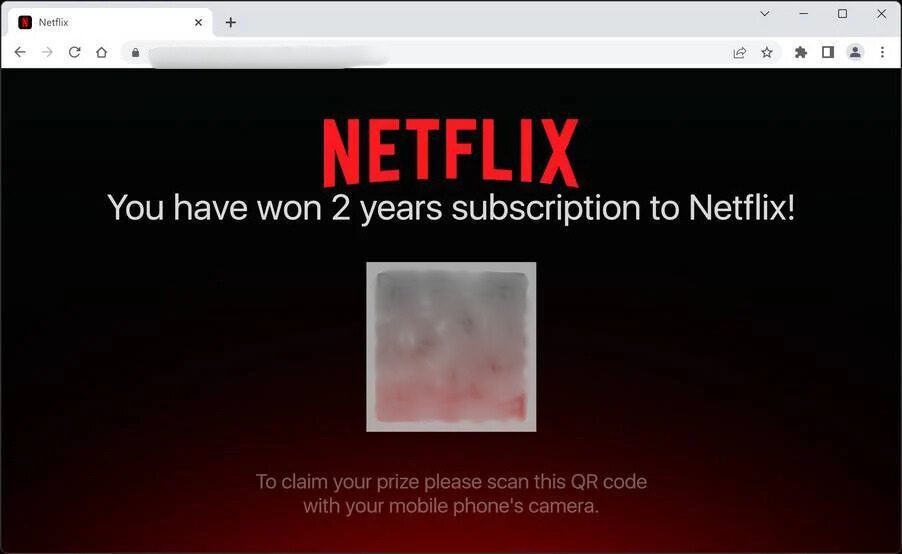
The email uses Norton's branding, a specific order number, a specific dollar amount, and language about automatic renewal to create the impression of a legitimate invoice. The prominent phone number is the actual scam mechanism - it is not Norton's number and calling it does not lead to Norton. Checking your actual Norton account online before calling any number would immediately reveal that no such charge exists or is pending.
Typical email language includes: "Thank you for renewing your Norton 360 subscription. Your account has been charged $349.99. If you did not authorize this renewal or wish to cancel, please contact our billing support at [phone number] within 24 hours," and "Order Confirmation - Geek Squad Total Tech Support Annual Plan - Amount Charged: $299.99. To cancel or request a refund, call [phone number] immediately."
Warning Signs
These signals indicate a subscription renewal email is fraudulent.
- The email claims a charge has been made or is about to be made for a service you do not remember subscribing to or renewing.
- The email provides a phone number to call to dispute or cancel - and this is presented as the primary resolution path rather than directing you to log into your account online.
- The sender's email address does not match the company being impersonated. The display name may say "Norton" or "Geek Squad" but the actual email address is a generic Gmail, Yahoo, or random domain address.
- The amount charged is unusually high for the type of subscription - $299 to $499 for an antivirus subscription, for example, is significantly above what these products actually cost.
- The email creates urgency - "contact us within 24 hours," "this charge is non-refundable after 48 hours" - that pushes you to call before you have time to verify independently.
- When you check your actual account with the company named, no such charge, order, or renewal appears in your billing history.
Who Scammers Often Target
Subscription renewal scams are sent in bulk to large lists of email addresses. They are particularly effective against people who have active subscriptions to the services being impersonated - because a Norton renewal email to an actual Norton customer feels more plausible than one sent to someone who has never used Norton.
Older adults are disproportionately targeted because they may be less familiar with how subscription billing actually works, more likely to be alarmed by an unexpected charge, and more likely to call a phone number in response to a billing concern rather than logging into an online account to verify it.
People who subscribe to multiple digital services and do not closely track their subscription costs are more likely to believe an unexpected renewal charge might be legitimate, since they cannot immediately rule it out from memory.
What the Scammer Is Trying to Achieve
The email itself is just the trigger. The scam's real purpose is to generate a phone call - and once you are on the phone with the scammer, the goal is to obtain your payment card information under the guise of processing a refund, or to gain remote access to your computer to "verify the charge" and then exploit that access to access financial accounts or install malware.
In the refund version, the scammer processes a fake "refund" to your bank account by displaying a manipulated banking interface that shows a large amount being deposited, then claims they refunded too much and asks you to wire back the excess. No actual deposit was ever made - this is a variant of the overpayment scam conducted through the fake refund process.
What To Do If You Encounter This Scam
If you receive an email claiming a subscription has renewed or a charge has been processed, here is the safest response.
- Do not call the phone number in the email. This is the most important step. The email itself causes no harm - calling the number is where the fraud occurs.
- Check the sender's actual email address. Click on or hover over the display name to see the real address. If it is not the company's official domain, the email is fake.
- Log in to your actual account with the company named - using the website address you type yourself, not any link from the email. Check your billing history. If no charge appears, the email is fraudulent.
- If you want to verify with the real company, find their actual customer service number on their official website and call that number - not any number from the email.
- Delete the email and report it as phishing to your email provider. You can also forward it to the FTC at spam@uce.gov.
How To Prevent Subscription Renewal Scams
These habits make subscription renewal scams straightforward to identify and dismiss.
- Never call a phone number from a renewal or billing email. If you have a billing concern, find the company's real number on their official website and call that. The number in the email is always the scam mechanism.
- Check the sender's actual email address on any invoice or renewal notice. A real Norton email comes from a norton.com address. A real Amazon email comes from an amazon.com address. Any deviation from the official domain is a red flag.
- Keep a simple list of the subscriptions you actually have - what they cost and when they renew. This makes it immediately obvious when an invoice does not match anything you recognize.
- Verify billing concerns by logging into your actual account online. Your account's billing history is the authoritative record of what has been charged - not an email you received.
- Use a dedicated email address for subscriptions and billing that is separate from your primary personal email. This reduces exposure to scam emails in your main inbox and makes it easier to identify when an invoice arrives for a service associated with a different email address.
Final Safety Advice
Subscription renewal scams are among the most volume-efficient fraud operations because they require almost no customization - the same email, with minor variations, can be sent to millions of addresses and generate thousands of calls. The alarm created by an unexpected large charge is a reliable trigger, and the phone number provides a direct channel to the scam.
The protection is simple and absolute: never call a number from a billing or renewal email. Check your actual account online. If the charge does not appear there, the email is fake. That single habit dismantles this entire category of fraud before it can cause any harm.
If you have already called and shared information, contact your bank immediately and report the incident to the FTC. Acting quickly gives you the best chance of limiting damage, and your report helps the FTC track and eventually act against the operations running these email campaigns at scale.