
Phishing Email Scam
How deceptive emails trick you into handing over passwords, financial details, and personal information
Phishing emails are designed to look like messages from trusted organizations - banks, retailers, government agencies, and more - to trick you into clicking malicious links or surrendering sensitive information.
In This Guide
- Overview of the Scam
- How the Scam Works
- Common Variations
- Example Scam Messages or Pop-Ups
- Warning Signs
- Who Scammers Often Target
- What the Scammer Is Trying to Achieve
- What To Do If You Encounter This Scam
- If You Already Paid or Shared Information
- How To Prevent Phishing Email Scams
- Final Safety Advice
Overview of the Scam
A phishing email is a fraudulent message designed to look like it came from a trusted source - a bank, a government agency, an online retailer, or a service you use - with the goal of getting you to click a malicious link, download a harmful attachment, or submit personal information on a fake website.
The word phishing comes from the idea of casting a wide net and waiting for someone to take the bait. Scammers send these emails by the millions, knowing that even a small fraction of recipients who click or respond can yield significant results. The messages are designed to trigger familiar trust signals - recognizable logos, professional language, and formatting that mirrors what the real organization actually sends.
Phishing is one of the most common and long-running forms of online fraud. It underlies many other scams, since stolen login credentials and personal data obtained through phishing are frequently used to commit further fraud, access financial accounts, or enable identity theft. Understanding how phishing works is one of the most broadly protective things a person can do.
How the Scam Works
Phishing emails follow a predictable structure, even though the specific details vary widely depending on which organization they impersonate and what information they are trying to obtain.
- You receive an email that appears to come from a recognizable and trusted source. The sender's display name, logo, and formatting closely match the real organization. The subject line is designed to get you to open it - often by suggesting urgency, a problem with your account, or an action you need to take.
- The body of the email presents a situation that requires your attention. Common scenarios include: your account has been compromised and needs to be verified, a package could not be delivered and you need to confirm your address, your payment information needs to be updated, or you are owed a refund and need to claim it.
- The email instructs you to click a link or open an attachment to resolve the issue. The link may appear to lead to a legitimate website but actually goes to a fake page controlled by the scammer. The attachment may contain malware that installs itself on your device when opened.
- If you click the link, you are taken to a page that looks almost identical to the real organization's website. You are asked to log in, verify your identity, or enter financial information. Everything you enter goes directly to the scammer.
- With your credentials or personal information in hand, the scammer can access your real accounts, make purchases, initiate transfers, sell your information, or use it to commit further fraud in your name.
The key to phishing is that it relies on your trust in familiar organizations. The email did not need to break into your account - it just needed you to hand over the access yourself.
Common Variations
Phishing emails impersonate many different types of organizations and take several distinct forms depending on their target.
- Account security alerts: An email claiming your bank, email provider, or social media account has been accessed from an unrecognized device and you need to verify your identity immediately through a provided link.
- Package delivery notifications: A message from a shipping company such as FedEx, UPS, or USPS claiming a package could not be delivered and you need to confirm your address or pay a small redelivery fee. The link leads to a fake site that collects payment card information.
- Tax refund notices: An email appearing to come from the IRS or a tax authority saying you are owed a refund and need to provide your banking details to receive it.
- Subscription or billing alerts: A message claiming your streaming service, software subscription, or utility payment has failed and your account will be closed unless you update your payment information.
- Spear phishing: A more targeted version in which the scammer uses your name, employer, or personal details obtained from social media or data breaches to make the email feel specifically addressed to you rather than mass-sent.
- Malware attachments: An email with a seemingly important document attached - an invoice, a delivery receipt, a court summons - that installs malicious software on your device when opened.
Example Scam Messages or Pop-Ups
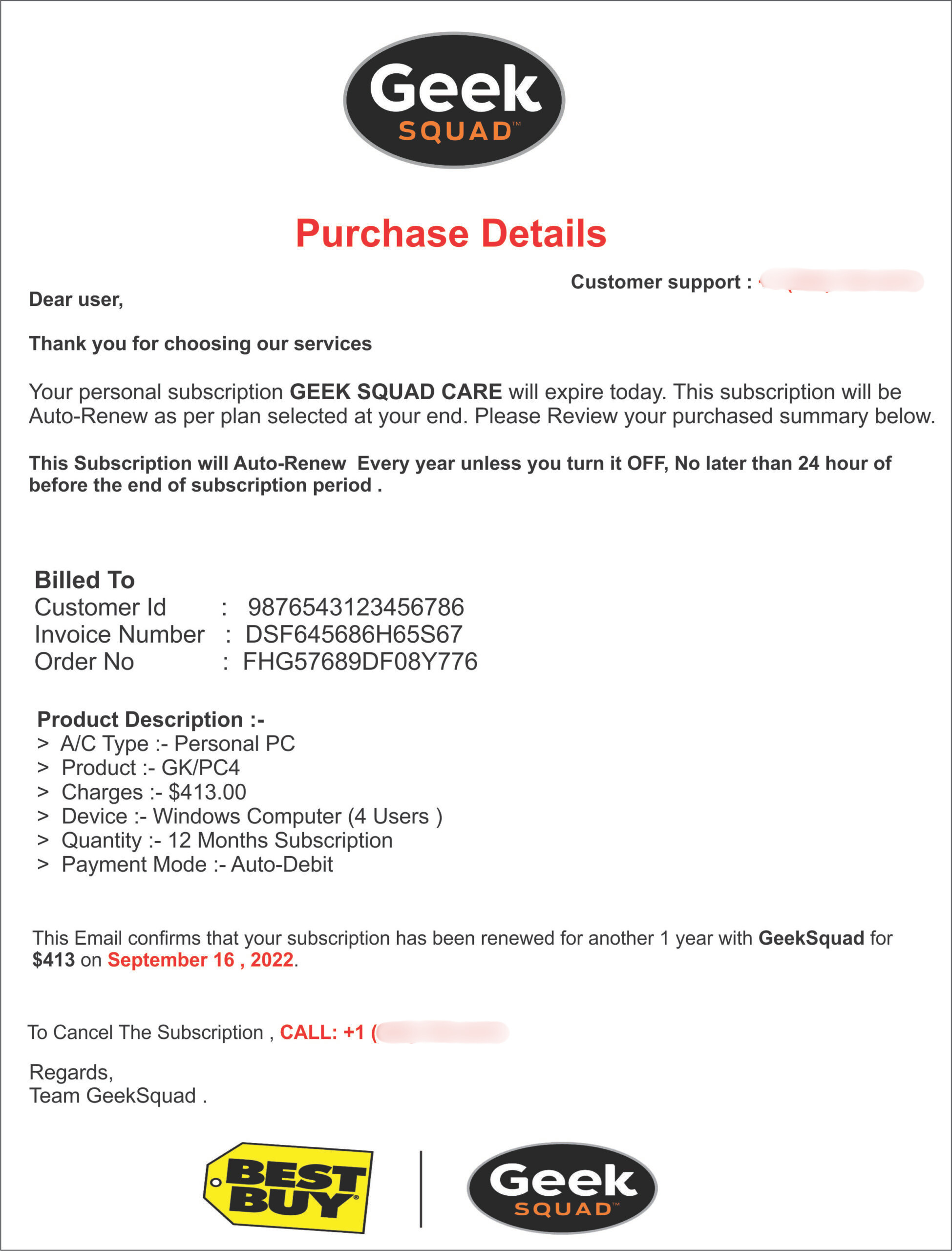
The screenshot below is a real example of the type of email used in phishing scams. These messages are designed to look authentic at a glance. Taking a moment to examine specific elements makes them much easier to identify.
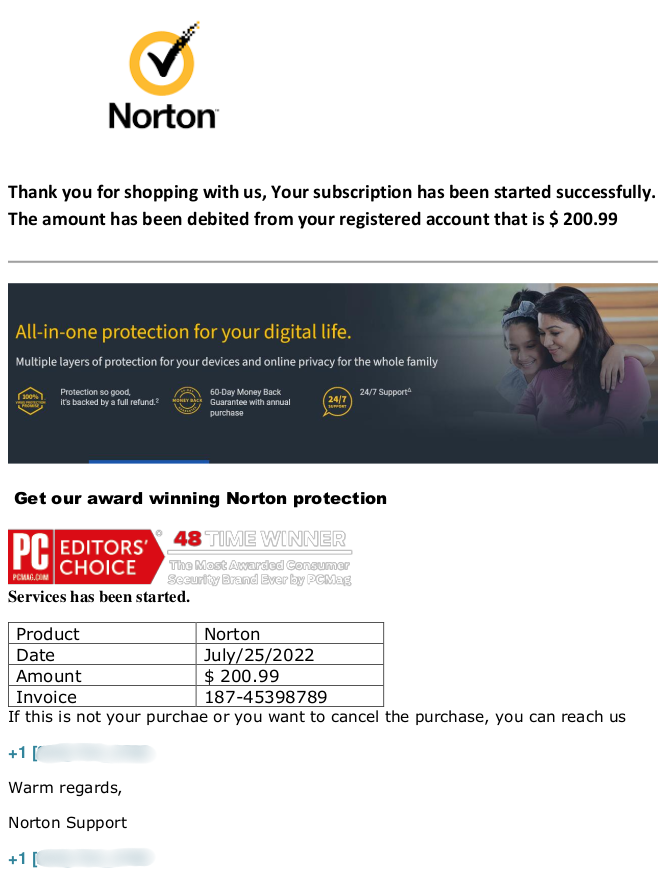
Look at the sender's actual email address, not just the display name - it will usually reveal a domain that is not the real organization's. Notice the urgency of the language, the generic greeting, and the call to action to click a link. Hovering over the link without clicking often reveals a suspicious URL that does not match the organization being impersonated. When in doubt, go directly to the organization's official website without using any link from the email.
Common phrases that appear in phishing emails include: your account has been temporarily suspended due to unusual activity, please verify your information within 24 hours to avoid account closure, we noticed a sign-in attempt from an unrecognized location, your payment method has expired and service will be interrupted, and action required - confirm your identity to restore access. These phrases are designed to make you feel that ignoring the message will have immediate consequences.
Warning Signs
The following signals are strong indicators that an email is a phishing attempt rather than a genuine communication.
- The sender's email address does not match the real organization's domain. The display name may say "PayPal" or "Chase Bank" but the actual address might be something like support-paypal-alert@gmail.com or chasebankverify@outlook.com.
- The email creates urgency - your account will be closed, a charge will go through, or access will be lost unless you act within 24 or 48 hours.
- The greeting is generic - "Dear Customer," "Dear Account Holder," or "Hello," rather than your actual name. Organizations that have your account information typically address you by name.
- The email asks you to click a link to log in, verify your details, or confirm your payment information. Hovering over the link reveals a URL that does not match the organization's real website.
- The email contains an attachment you were not expecting - an invoice, a document, a receipt - that you are asked to open. Unsolicited attachments should always be treated with caution.
- The language or formatting is slightly off - minor spelling errors, unusual phrasing, inconsistent fonts, or a layout that does not quite match what you normally receive from that organization.
- The email asks you to confirm sensitive information such as your password, full credit card number, Social Security number, or account PIN. Legitimate organizations do not request these details by email.
- The request feels unusual for the organization - a shipping company asking for payment to release a package, a government agency emailing about a refund, or a bank asking you to log in through an email link rather than through their app.
Who Scammers Often Target
Phishing emails are sent in massive volumes to essentially anyone with an email address. However, certain groups face higher rates of success for scammers and are therefore approached more aggressively.
Older adults are disproportionately affected. Many are less familiar with the specific visual cues that distinguish a phishing email from a real one - such as checking the sender's actual email address or hovering over a link to preview the URL - and may be more inclined to take urgent-sounding messages at face value.
People who use a wide range of online services are also frequently targeted, since the more accounts someone has, the more likely a broadly sent phishing email will impersonate something they actually use. A fake Amazon email is more believable to an Amazon customer, and scammers send these in volumes large enough that the overlap with real customers is substantial.
Employees and small business owners are targeted with work-related phishing attempts that impersonate software tools, payroll services, or internal communications. These attacks are often more personalized and harder to detect than consumer-targeted phishing.
What the Scammer Is Trying to Achieve
The most common goal is your login credentials. With your username and password for a bank, email provider, or financial service, a scammer can access your account, change your password to lock you out, and exploit everything stored there - saved payment methods, personal information, connected accounts, and more.
When the phishing email impersonates a retailer or shipping service, the goal is more often your payment card details. The fake site asks you to enter your card number, expiration date, and security code under the guise of confirming a delivery or completing a refund.
Phishing emails that carry attachments have a different goal: installing malware on your device. This software can log keystrokes, take screenshots, access saved passwords, or give the scammer remote control of your computer - allowing them to harvest information over time rather than in a single transaction.
What To Do If You Encounter This Scam
If you receive an email that you suspect is a phishing attempt, the following steps will help you respond safely.
- Do not click any link in the email. If you want to check the status of your account with the organization the email claims to represent, open a new browser tab and go directly to their official website by typing it yourself.
- Do not open any attachment in the email unless you were specifically expecting it and can verify the sender through a separate channel. Unexpected attachments from any sender should be treated with caution.
- Check the sender's actual email address by clicking on or hovering over the display name. If the domain does not match the real organization's official address, the email is fraudulent.
- Do not reply to the email. Replying confirms to the scammer that your email address is active, which can lead to more targeted attempts.
- Report the phishing email using your email provider's reporting tool - most email services have a "Report Phishing" or "Report Spam" option. You can also forward it to the real organization being impersonated, as most major companies have a dedicated address for reporting phishing attempts.
- Delete the email after reporting it. If you clicked a link before realizing it was fraudulent, change your password for that account immediately and enable two-factor authentication.
How To Prevent Phishing Email Scams
Building a few consistent habits makes phishing emails significantly easier to recognize and avoid.
- Always check the sender's actual email address, not just the display name. The display name can say anything - the real domain in the address is what matters. If it does not match the organization's official domain exactly, treat the email with suspicion.
- Never click links in emails that ask you to log in, verify your account, or update your payment information. Go directly to the organization's website in a new tab instead.
- Enable two-factor authentication on all accounts that support it. Even if a scammer obtains your password through phishing, two-factor authentication prevents them from accessing your account without also having your phone.
- Be particularly careful with unexpected attachments. If you were not expecting a file from the sender, verify the request through a separate channel before opening it.
- Keep your email provider's spam filter active and use the phishing report feature when you identify a suspicious email. These reports improve filtering for everyone using the service.
- Learn what your real bank, Amazon, and other commonly impersonated organizations' emails actually look like. Familiarity with the real thing makes fakes easier to spot.
- Consider using a password manager. Password managers only autofill credentials on the correct domain, so they will not fill in your password on a fake lookalike site - providing an automatic layer of protection against phishing.
Final Safety Advice
Phishing emails are the foundation of a huge portion of online fraud because they work. They work not because people are careless but because they are designed by people who have studied exactly what makes us trust a message enough to act on it quickly. A well-crafted phishing email can be genuinely difficult to distinguish from the real thing, especially when you are busy or distracted.
The single most protective habit is this: never click a link in an email to log into an account or verify information. Go directly to the website yourself by typing it in a new tab. That one habit breaks the most common form of phishing regardless of how convincing the email appears.
Take a moment before opening any attachment you were not specifically expecting. Pause before acting on any email that creates urgency around your account. These pauses cost you a few seconds and can save you from significant harm.
If you have already clicked a link or entered information, change your passwords, contact your bank if financial details were involved, and review your accounts carefully for any suspicious activity. Acting quickly can dramatically reduce the damage and help you regain control before the scam spreads further.
Report
Block Member?
Please confirm you want to block this member.
You will no longer be able to:
- Mention this member in posts
Please allow a few minutes for this process to complete.