
Fake Antivirus Scam
How fraudulent security software tricks you into paying for protection you don't need - and sometimes installs the very threats it claims to remove
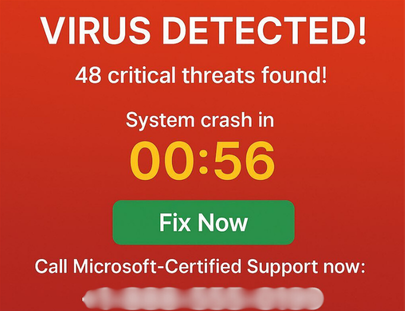
Fake antivirus programs generate alarming-looking scan results to convince you your computer is infected - then charge you to "fix" problems that were either fabricated or installed by the program itself.
In This Guide
- Overview of the Scam
- How the Scam Works
- Common Variations
- Example Scam Messages or Pop-Ups
- Warning Signs
- Who Scammers Often Target
- What the Scammer Is Trying to Achieve
- What To Do If You Encounter This Scam
- If You Already Paid or Shared Information
- How To Prevent Fake Antivirus Scams
- Final Safety Advice
Overview of the Scam
Fake antivirus scams - also called rogue security software or scareware - involve programs that pose as legitimate security tools while either doing nothing useful, generating false threat reports to sell unnecessary upgrades, or actively installing malware on the devices they claim to protect. The scam may begin with a frightening pop-up ad, a deceptive download link, or a program that arrived bundled with other software.
The core mechanic is fear. The fake program presents alarming-looking scan results - dozens of "viruses," "trojans," and "critical threats" - and insists the only way to remove them is to purchase the full version of the software. The threats are either completely fabricated or were installed by the program itself to justify the purchase.
Fake antivirus software has been a persistent form of digital fraud for many years. It takes advantage of the widely understood importance of device security and the fact that most people cannot independently verify whether a threat report is genuine or manufactured.
How the Scam Works
Fake antivirus scams reach victims through several entry points but follow a consistent pattern once the program is installed or the pop-up appears.
- You encounter the scam through a pop-up ad on a website, a misleading search result, an email attachment, or software bundled with a free download. The initial alert claims to have detected threats on your computer and urges you to act immediately.
- You click the alert - which may install the fake program automatically or direct you to download it. The program launches and runs a "scan" that completes quickly and returns alarming results: dozens of threats, critical system issues, and urgent warnings.
- The program insists the threats cannot be removed with the free version and presents a purchase screen for the "full" version - typically $30 to $100. The interface looks professional and the payment process appears legitimate.
- If you pay, one of several things happens: nothing changes because the threats were fabricated and the "removal" is also fake, the program continues to generate new alerts demanding additional purchases, or the payment information you provided is used for unauthorized charges.
- In more aggressive versions, the fake program blocks access to your real security software, prevents you from uninstalling it, or installs actual malware in the background while appearing to scan for threats.
Common Variations
Fake antivirus scams appear in several forms depending on the delivery method and the specific deception used.
- Browser pop-up scareware: An alarming alert appears in your browser claiming your computer is infected. The alert may look like a Windows or Mac system message but is actually webpage content. Clicking anywhere on it can trigger a download or redirect to a payment page.
- Bundled software installation: A fake security program is installed alongside a free application - a media player, a PDF tool, or a game - without being clearly disclosed. It then begins generating threat alerts to push you toward purchasing the full version.
- Fake subscription renewal: An email or pop-up claims your antivirus subscription has expired and must be renewed immediately. The renewal link leads to a fraudulent payment page rather than the real company's website.
- Rogue cleaner or optimizer: Rather than claiming to be antivirus software, the program presents itself as a system optimizer or registry cleaner. It runs a scan showing thousands of "errors" and charges a fee to fix them. The errors are fabricated.
- Tech support bridge: The fake antivirus alert includes a phone number to call for help. This connects to a tech support scammer who takes remote access to your device, confirms the "infection," and charges for removal services. This version is covered in more detail in our Tech Support Scam guide.
Example Scam Messages or Pop-Ups
The example below shows what a fake antivirus alert or scan result typically looks like. The design closely mimics legitimate security software interfaces to make the threat appear real.
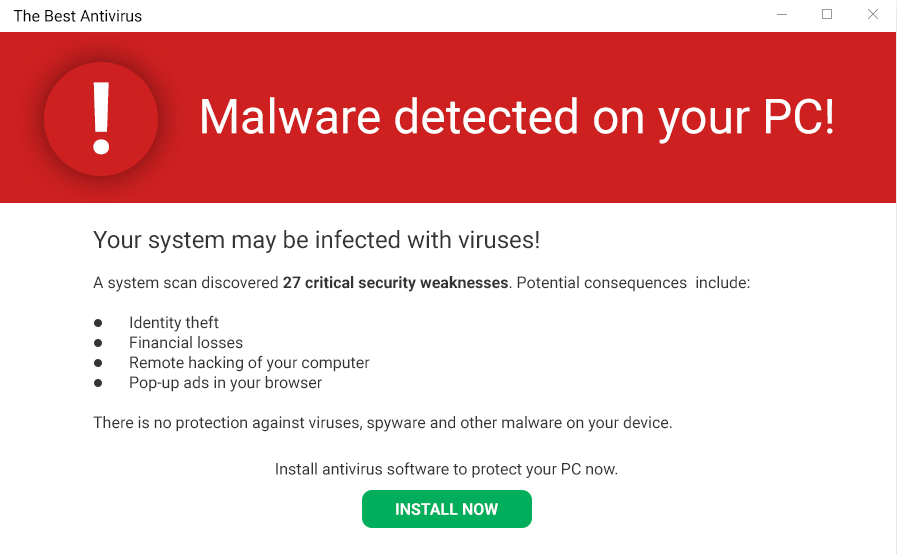
The scan results use official-sounding threat names, severity ratings, and a progress bar to create the appearance of a genuine security scan. The number of detected threats is high enough to be alarming but not so extreme as to seem implausible. The purchase prompt is positioned immediately after the scary results to capture the impulse to resolve the problem before the fear fades. A real security program would remove detected threats as part of its standard function - not redirect you to a purchase page.
Common fake antivirus alert text includes: "CRITICAL ALERT: 14 viruses detected on your PC. Your personal data and banking information may be at risk. Purchase the full version now to remove all threats immediately," and "Your antivirus subscription has expired. Your computer is now unprotected. Renew now to remove 27 detected threats."
Warning Signs
These signals indicate a security alert or software program is fraudulent rather than a genuine security tool.
- The alert appeared in your web browser as a pop-up, a full-screen overlay, or a browser notification rather than from a security application you already have installed.
- The scan completed unusually quickly and returned a very large number of threats. Real security scans take time and do not routinely find dozens of critical infections on a well-maintained computer.
- The program demands payment to remove threats it has already identified. Legitimate security software removes threats as part of its core function - it does not hold your device hostage until you upgrade.
- You do not recognize the security program's name, or it arrived without you actively choosing to install it.
- The alert includes a phone number to call for immediate help. Real security software does not direct you to call a hotline to remove detected threats.
- The program prevents you from opening other applications, accessing your real security software, or uninstalling it through normal means.
- After paying for the "full version," new alerts and threats continue to appear at regular intervals.
Who Scammers Often Target
Fake antivirus scams reach people broadly through web advertising and bundled software, but are particularly effective against people who are concerned about their device security but less familiar with how real security software actually behaves. If you know that Windows Defender runs quietly in the background and does not generate browser pop-ups, you will immediately recognize a browser-based security alert as fraudulent. Without that context, the alert can appear entirely credible.
Older adults who are newer to computing and people who use older operating systems with less built-in security are more frequently affected. People who click on online ads freely are also more likely to encounter these scams, as fake antivirus is often distributed through deceptive advertising networks.
What the Scammer Is Trying to Achieve
The immediate goal is payment for the fake software license - typically $30 to $100 per purchase. Beyond the initial sale, the payment information provided is often used for additional unauthorized charges, and the program may continue to generate alerts pushing further purchases.
More sophisticated fake antivirus programs also install actual malware in the background - keyloggers, spyware, or remote access tools - which harvest sensitive information from the device over time. In these cases, the fake software purchase is secondary to the ongoing data collection it enables.
What To Do If You Encounter This Scam
If you see a security alert that you suspect may be fake, here is how to respond safely.
- Do not click anywhere on the pop-up or alert. Close the browser tab or window using the X button at the top of your screen - or force-quit your browser entirely if the pop-up prevents normal navigation.
- Do not call any phone number displayed in the alert. These numbers connect to tech support scammers, not to real security companies.
- Run a scan using your actual, already-installed security software - Windows Defender, Malwarebytes, or whichever program you use. If no real threats are found, the earlier alert was fabricated.
- If you accidentally downloaded a file or installed a program from the alert, do not run it. Use your real security software to scan your device and remove any suspicious software.
- Report the experience to the FTC at ReportFraud.ftc.gov. If the fake software was promoted through a major platform's advertising, report it to that platform as well.
How To Prevent Fake Antivirus Scams
These habits make fake security software easy to identify and avoid.
- Know that browser pop-ups are never real virus warnings. Your security software communicates through its own interface, not through your web browser. Any security alert appearing in a browser is fake.
- Keep a reputable, well-known security program installed and up to date. Windows Defender comes built into Windows and is effective. Malwarebytes is a trusted free option for additional scanning. Having a real tool gives you a reliable reference point.
- Only download security software from the developer's official website or a well-known software distributor. Never install security software from a pop-up ad, an email link, or a bundled installer you did not intentionally choose.
- Read installation prompts carefully when installing any free software. Rogue programs often arrive as optional add-ons that are pre-checked in an installer. Unchecking these prevents installation.
- Use a browser with built-in pop-up blocking and keep it updated. Modern browsers block many of the advertising networks used to distribute fake antivirus alerts.
Final Safety Advice
Fake antivirus scams work by making your computer feel like an unsafe and unfamiliar place - full of threats you cannot see or understand without help. The manufactured urgency of a scan showing dozens of infections is designed to make you feel that acting immediately is the only responsible choice.
The knowledge that protects you most is simple: browser pop-ups are never real security alerts, and real security software does not ask you to pay to remove threats it has already detected. With those two facts in mind, the entire category of fake antivirus scams becomes immediately recognizable.
If you have already purchased fake software, contact your card issuer, remove the program, run a real security scan, and change your passwords. The sooner you take these steps, the less opportunity the program has to cause additional harm.