
Amazon Order Scam
How fake Amazon alerts and order confirmations are used to steal your account access and financial information
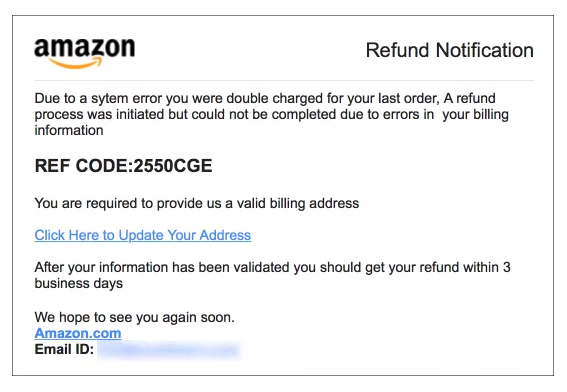
Scammers send fake Amazon order confirmations and suspicious activity alerts to trick you into handing over your account credentials or payment information.
In This Guide
- Overview of the Scam
- How the Scam Works
- Common Variations
- Example Scam Messages or Pop-Ups
- Warning Signs
- Who Scammers Often Target
- What the Scammer Is Trying to Achieve
- What To Do If You Encounter This Scam
- If You Already Paid or Shared Information
- How To Prevent Amazon Order Scams
- Final Safety Advice
Overview of the Scam
An Amazon order scam is a type of fraud where someone impersonates Amazon and contacts you with a fake order confirmation, a suspicious purchase alert, or a message about a problem with your account. The goal is to trick you into clicking a malicious link, calling a fake support number, or handing over your Amazon login credentials and payment details.
Amazon is one of the most frequently shopped platforms in the country, and millions of people receive legitimate order emails and texts from them regularly. Scammers take full advantage of this familiarity. A message that looks like a real Amazon notification is easy to take seriously, especially when it claims a large or unexpected purchase has been made in your name.
Amazon order scams are reported year-round and rank among the most common forms of brand impersonation fraud. Because so many people have Amazon accounts with stored payment methods, the potential payoff for scammers is significant, and the volume of these scams reflects that.
How the Scam Works
The scam almost always begins with an unexpected message that mirrors the look and tone of a real Amazon communication. The sequence typically unfolds as follows.
- You receive an email, text message, or phone call that appears to come from Amazon. The message may include Amazon's logo, familiar formatting, and language that closely matches what you would expect from a real Amazon notification.
- The message tells you that a large or unusual purchase has been made on your account - often something like a high-end laptop, a gift card, or an expensive electronic. The specific amount is chosen to feel alarming enough to prompt immediate action.
- You are told to call a number or click a link to dispute the charge, verify your account, or cancel the order before it ships. The urgency is deliberate - the scammer wants you to act before pausing to verify anything independently.
- If you call the number, you are connected to someone posing as an Amazon customer service representative. They sound professional and may reference details about your account to seem legitimate.
- The fake representative tells you that to cancel the order and secure your account, they need to verify your identity. This involves walking you through providing your Amazon login credentials, your payment card details, or in some cases a remote access session on your device.
- Once they have your information, they use it to access your real Amazon account, make purchases, harvest stored payment methods, or sell your credentials to other fraudsters.
Amazon does not call you unsolicited about order problems. Any genuine concern about a purchase can always be verified by going directly to amazon.com and checking your order history without clicking any link from a message.
Common Variations
Amazon order scams take several forms depending on how the scammer initiates contact and what they are trying to obtain.
- Fake order confirmation emails: You receive an email that looks exactly like an Amazon order receipt for a product you did not buy, with a link to cancel or dispute the charge. The link goes to a fake Amazon login page designed to steal your credentials.
- Suspicious activity calls: A caller claims to be from Amazon's fraud department and says your account has been flagged for unusual purchases. They ask you to verify your identity to resolve the issue and protect your account.
- Amazon Prime renewal scams: You receive a message saying your Amazon Prime membership is about to renew at a new, higher price and that you need to call or click to cancel. The contact information in the message leads to a scammer rather than Amazon.
- Refund overpayment scams: A caller claims Amazon owes you a refund and needs to access your bank account or direct a payment to process it. This is used to extract banking details or initiate unauthorized transfers.
- Gift card demands: After gaining your trust, the fake representative tells you the quickest way to secure your account or reverse a fraudulent charge is to purchase Amazon or other gift cards and provide the codes.
- Text message phishing: A text arrives with a short message about a package problem, a failed delivery, or an account issue, with a link to resolve it. The link leads to a fake site built to capture your login information.
Example Scam Messages or Pop-Ups
The screenshot below is a real example of the type of communication used in Amazon order scams. These messages are designed to look indistinguishable from genuine Amazon notifications at first glance. Understanding what sets them apart makes them much easier to catch before any harm is done.
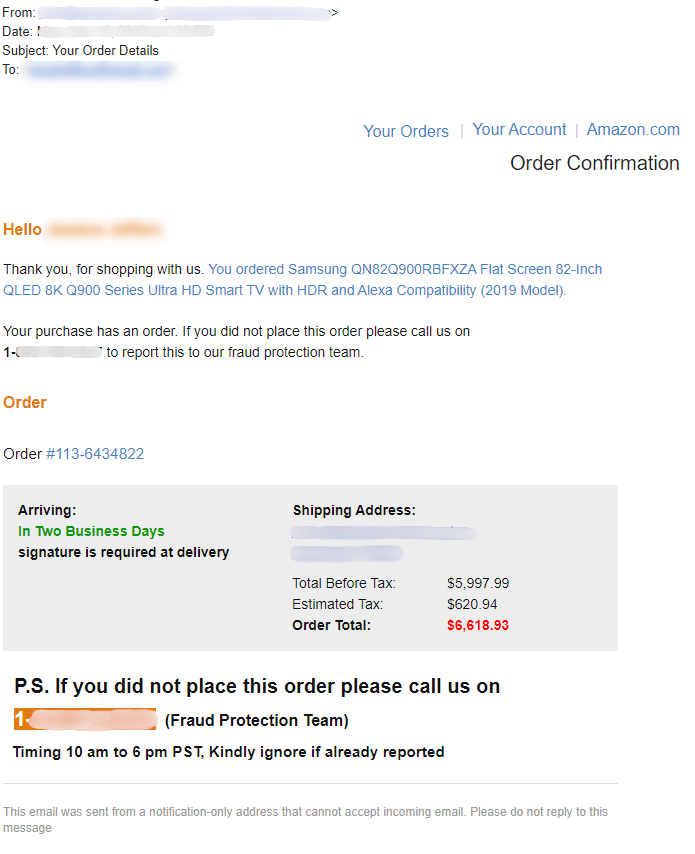
Notice the Amazon branding, the specific and alarming purchase amount, and the call to action to dispute the charge immediately. Look closely at the sender's email address - legitimate Amazon emails come from @amazon.com only. Any link to cancel or dispute in these messages leads to a fake site, not the real Amazon. Always check your actual order history at amazon.com directly.
Common phrases that appear in these scam messages include: your order has been placed for $849.99, if this was not you please call us immediately, your Amazon account has been locked due to suspicious activity, your Prime membership will renew at an increased rate unless you cancel now, and a refund is pending for your account and we need to verify your information. These phrases are designed to create concern and prompt immediate action before you think to verify independently.
Warning Signs
The following signals are strong indicators that a message or call claiming to be from Amazon is not legitimate.
- You receive an order confirmation for a purchase you did not make, especially for a high-value item, with a number to call or a link to dispute it.
- The sender's email address does not end in @amazon.com. Scam emails often use addresses like @amazon-support.net, @amazon-orders.com, or random addresses that include the word "amazon" but are not the real domain.
- The message creates urgency - the order will ship in hours, your account will be locked, or you must act before a deadline to avoid being charged.
- You receive an unsolicited phone call from someone claiming to be Amazon's fraud or security team. Amazon does not proactively call customers about order issues.
- The caller or message asks you to provide your Amazon password, credit card details, or Social Security number to verify your identity or process a refund.
- You are asked to purchase gift cards of any kind to resolve an account issue or cancel a fraudulent order. This is never how Amazon handles disputes.
- A link in the message takes you to a site that is not amazon.com, even if the page is designed to look exactly like Amazon's website.
- The caller asks for remote access to your computer or device to help you cancel an order or secure your account.
Who Scammers Often Target
Amazon order scams are sent broadly, but certain groups are approached more frequently or are more likely to be drawn in by the approach.
Frequent Amazon shoppers are among the most likely targets simply because the premise of the scam is more believable. Someone who orders from Amazon several times a month is less likely to immediately dismiss a message about an unexpected order, since orders are a routine part of their experience with the platform.
Older adults are disproportionately targeted. Many use Amazon regularly but may be less familiar with how to verify whether a message is genuine, or may not know that Amazon's actual order history is always visible in their account without needing to call anyone. The combination of a recognizable brand and an alarming claim is particularly effective.
Amazon Prime members are frequently targeted with renewal-related scams, since the membership fee is a familiar recurring cost that many people are sensitive to. A message claiming the annual fee is increasing or that a renewal failed is a reliable hook.
What the Scammer Is Trying to Achieve
The most common goal is your Amazon account credentials. With your login, a scammer can access stored payment methods, ship purchases to themselves, harvest your personal information, and lock you out of your own account by changing the password and recovery email.
When the scam involves a fake refund or overpayment, the goal is your bank account details. The scammer poses as helping you receive money you are owed, but the actual purpose is to collect the information needed to initiate unauthorized withdrawals or transfers.
Gift card demands, while less sophisticated, have the simplest goal: immediate, untraceable cash. Once the codes are read over the phone, those funds are effectively gone.
What To Do If You Encounter This Scam
If you receive a suspicious message or call claiming to be from Amazon, the following steps will help you respond safely.
- Do not click any link in the message. Open a new browser window and go directly to amazon.com. Log in and check your order history and account activity. If no such order exists, the message is fraudulent.
- Do not call any phone number provided in the message. If you need to contact Amazon, use the number or chat option found directly on amazon.com under the Help section.
- Do not provide your Amazon password, payment card details, or any personal information to an unsolicited caller, even if they appear to know details about your account.
- Do not purchase gift cards at the request of anyone claiming to represent Amazon. This is never a legitimate method Amazon uses for any reason.
- If you receive a suspicious email, report it by forwarding it to stop-spoofing@amazon.com. Amazon uses these reports to investigate fraudulent activity.
- Report the scam to the FTC at ReportFraud.ftc.gov to help investigators track and address these operations.
How To Prevent Amazon Order Scams
Prevention comes from developing simple habits around how you verify anything that appears to come from Amazon.
- Make it a habit to check your Amazon order history directly at amazon.com any time you receive a message about a purchase. If the order is not listed in your account, the message is not from Amazon.
- Know that Amazon does not call you unsolicited about order problems, fraud alerts, or account security. Any call claiming to be from Amazon's fraud or security team without you initiating it should be treated as suspicious.
- Check the sender's email address on any message claiming to be from Amazon. Legitimate Amazon emails come from addresses ending in @amazon.com only, not from variations or lookalike domains.
- Enable two-step verification on your Amazon account. This makes it significantly harder for anyone who obtains your password to access your account without also having your phone.
- Be cautious about clicking links in emails or texts about Amazon orders. Going directly to amazon.com in a new window is always safer than following a link in a message.
- Talk about this scam with family members who shop on Amazon regularly, particularly older relatives. The simple habit of checking the actual Amazon account before reacting to any message about an order can prevent a great deal of harm.
- Use a phone number lookup tool when you receive an unexpected call from a number claiming to be Amazon, to quickly check whether that number has been associated with scam activity.
Final Safety Advice
Amazon is a platform that billions of people interact with regularly, and scammers have spent years perfecting messages that look and feel exactly like real Amazon communications. A fake order confirmation for a large amount hits differently when you have been shopping on Amazon all week and are not entirely sure what you ordered last.
The most important habit to build is this: whenever you receive any message about an Amazon order or account issue, go directly to amazon.com in a new window and check your account before doing anything else. That one step will tell you everything you need to know. If the order does not exist in your account, the message is a scam, regardless of how official it looks.
You are always allowed to verify before acting. The urgency in these messages is constructed. A real order problem at Amazon can always wait the two minutes it takes you to log in and check your account independently.
If you have been affected, change your Amazon password, secure your account, report what happened, and contact your bank if any payment information was shared. You are not alone in this, and acting quickly gives you the best chance of limiting the damage.