Remote Access Scam
How scammers convince you to hand over full control of your computer - then use that access to drain your accounts and steal your identity
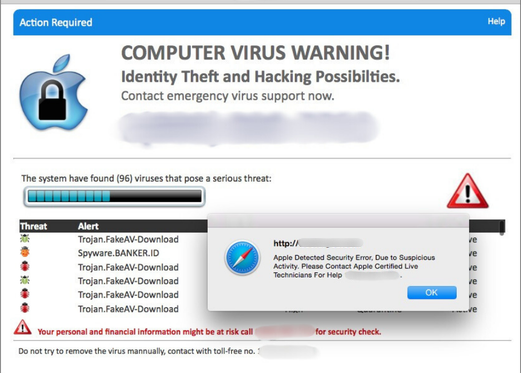
Remote access scams are uniquely dangerous because the victim willingly installs the access tool - making the entry feel safe. Once connected, the scammer has unrestricted visibility of everything on the computer, including banking sessions, saved passwords, and personal files.
In This Guide
- Overview of the Scam
- How the Scam Works
- Common Variations
- Example Scam Messages or Pop-Ups
- Warning Signs
- Who Scammers Often Target
- What the Scammer Is Trying to Achieve
- What To Do If You Encounter This Scam
- If You Already Paid or Shared Information
- How To Prevent Remote Access Scams
- Final Safety Advice
Overview of the Scam
Remote access scams convince victims to install legitimate remote desktop software - tools like AnyDesk, TeamViewer, or Windows Quick Assist - and then hand over the access code to someone posing as a tech support agent, bank representative, or government official. With that access, the scammer can see and control everything on the victim's computer in real time.
The dangerous quality of this scam is that the remote access tool itself is real and legitimate. AnyDesk and TeamViewer are used by genuine IT professionals every day. The fraud lies entirely in who the victim believes they are giving access to - and what that person does once connected.
Remote access scams are one of the most financially damaging forms of fraud because they give the scammer direct visibility into banking sessions, saved passwords, email accounts, and personal files - often in a single session. The losses can be severe and happen quickly while the victim is still on the phone believing they are being helped.
How the Scam Works
Remote access scams use a trusted-sounding pretext to make the access request feel like a routine technical step.
- You receive a call, see a pop-up alert, or respond to a search result that connects you to someone claiming to be a tech support agent (from Microsoft, Apple, or your internet provider), a bank fraud department representative, or a government agency worker.
- The caller describes a serious problem - your computer has been infected, your bank account shows suspicious activity, or your IP address has been flagged for illegal activity. The problem is serious enough to require remote examination of your computer to resolve.
- The caller asks you to download AnyDesk, TeamViewer, or another remote access tool, and to share your access code. They may walk you through the installation step by step, maintaining a calm, professional tone throughout.
- Once connected, the scammer opens your bank accounts, email, and personal files while keeping you engaged on the phone with technical-sounding narration. They may temporarily black out your screen - a standard feature of remote access software - while they work.
- Money is transferred from your accounts, passwords are changed, new accounts are opened in your name, or the scammer installs backdoor software that allows them to reconnect later. The session ends with a payment demand for the "service," and the scammer disconnects before the victim realizes what has happened.
Common Variations
Remote access is used as a tool within several different scam scenarios.
- Tech support version: The most common. A pop-up alert or unsolicited call leads to a "technician" who asks for remote access to diagnose and remove a virus. Once connected, they perform fake diagnostics and charge for repair.
- Bank fraud department version: A caller claiming to be from your bank's fraud team says suspicious activity has been detected on your account. They ask to "remotely verify" your computer to confirm it has not been compromised. Once connected, they transfer funds.
- Overpayment variation: A scammer claims they accidentally overpaid you for something and asks to connect remotely to "reverse the transaction." They manipulate the display of your banking app to make it appear an overpayment occurred, then transfer money while the screen is blacked out.
- Government agency version: A caller claims to be from the IRS, SSA, or another agency and says your accounts have been linked to suspicious activity. Remote access is requested to "secure your device" as part of an investigation.
- Refund scam version: A caller claims you are owed a refund for a canceled subscription or overpaid service and needs remote access to process it. This is described in more detail in our Tech Support Scam guide.
Example Scam Messages or Pop-Ups
The example below shows how a remote access scam call typically unfolds - from the initial contact through the remote access request.
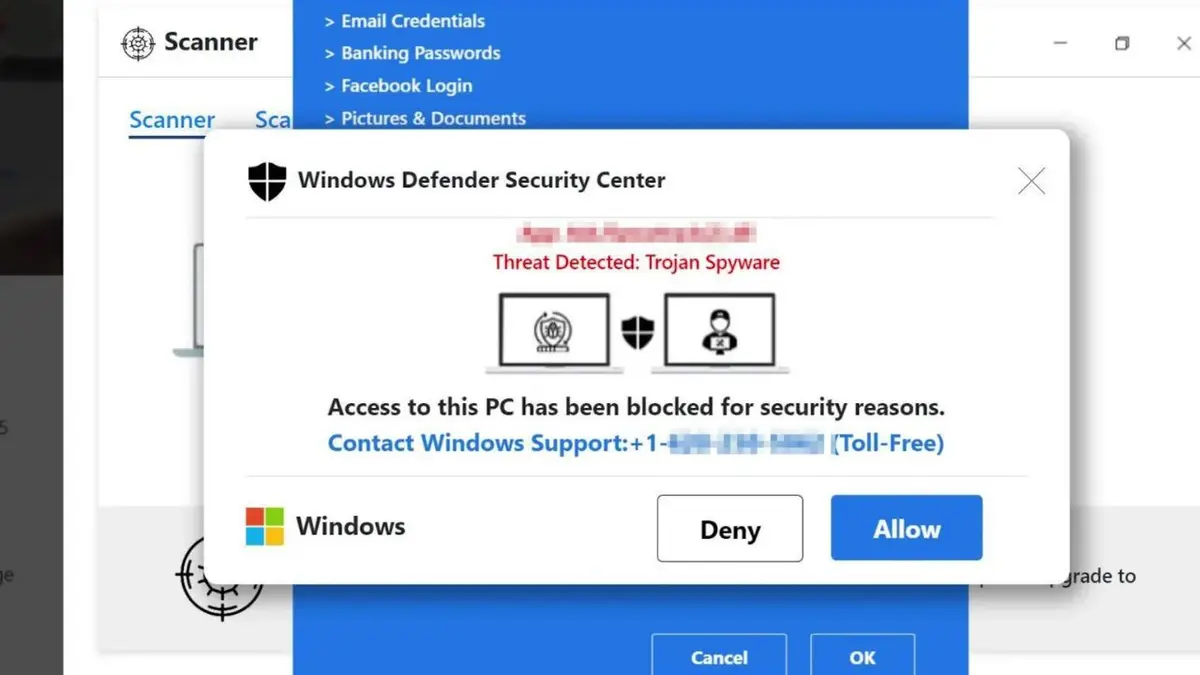
The caller maintains a professional, patient tone and frames each step as a routine technical process. The instruction to download a remote access tool is presented as standard procedure - the kind of thing any IT professional would ask. The access code is shared because the caller seems trustworthy and knowledgeable. Once the session begins, the victim can see their own screen being controlled - which is often framed as the technician "running diagnostics."
Typical language includes: "To run the diagnostic, I'll need you to go to anydesk.com and download the application. Once it opens, you'll see a 9-digit number - please read that to me and I'll connect to your computer to check for the infection," and "I'm going to need to access your computer remotely to verify that the suspicious transactions weren't authorized from your device. Please download TeamViewer and share the ID with me."
Warning Signs
These signals indicate that a remote access request is fraudulent rather than legitimate technical assistance.
- The contact was initiated by the other party - through a call you did not make, a pop-up you did not expect, or a message you did not request. Legitimate technical support does not contact you first.
- You are asked to download remote access software as part of resolving a problem. Legitimate support for consumer devices does not typically require third-party remote access tools.
- The caller's urgency increases if you hesitate or ask questions. A genuine technician is comfortable with you verifying their identity before proceeding.
- The remote session includes your screen being blacked out - the scammer is hiding their activity from you while they access your accounts or make changes.
- You are shown "evidence" of an infection or problem using Windows system tools like Event Viewer, which display normal operational entries that are misrepresented as signs of serious issues.
- After the "diagnostic," a significant service fee is requested - typically several hundred dollars - payable by gift card, wire transfer, or bank transfer.
- The caller asks you to log into your bank account during the session, claiming they need to verify it is secure or process a refund.
Who Scammers Often Target
Remote access scams primarily target older adults who are less familiar with how remote access software works and more likely to trust someone who presents themselves as a qualified technical professional. The calm, patient, authoritative tone these scammers adopt is specifically designed to make the victim feel they are in good hands.
People who have recently experienced a real computer problem are also more susceptible because the scenario of having an ongoing technical issue that requires professional help feels plausible from their recent experience.
Anyone who has ever called a legitimate tech support line and experienced remote access as a normal part of that process may be more likely to comply with a similar request from a fraudulent caller, because the format matches something they have actually done before.
What the Scammer Is Trying to Achieve
The goal of remote access is direct, immediate access to everything on the victim's computer - banking sessions left open in a browser, saved passwords, email accounts, personal documents, and financial records. A single remote session can yield everything needed for comprehensive identity theft in addition to direct fund transfers.
Service fee collection is a secondary goal - typically $200 to $1,000 for the fake repair service. But the value of the information and account access obtained during the session often far exceeds the service fee collected.
What To Do If You Encounter This Scam
If anyone asks you to install remote access software and share an access code, here is the correct response.
- Decline immediately. Do not download AnyDesk, TeamViewer, Quick Assist, or any other remote access tool for someone who contacted you first. Hang up the phone or close the chat window.
- If the request came from a pop-up alert, close your browser and do not call the number displayed. See our Pop-Up Virus Warning Scam guide for specific steps.
- If you believe there is a real problem with your computer or your bank account, contact the company directly using a phone number from their official website or the back of your card - not any number provided by the caller.
- Report the attempted scam to the FTC at ReportFraud.ftc.gov and to the company being impersonated - Microsoft, Apple, your bank, or a government agency.
How To Prevent Remote Access Scams
One rule prevents this scam entirely: never give remote access to your computer to anyone who contacts you first.
- Only allow remote access when you have initiated the support request - when you called the company's official number and a representative asks to connect. Never accept remote access from someone who contacted you unsolicited.
- Know that pop-up alerts, cold calls, and unsolicited emails are never legitimate reasons to install remote access software. Real technical emergencies are addressed through channels you initiate.
- If you receive a call from someone claiming to be from your bank's fraud team about suspicious activity, hang up and call the number on the back of your card to verify independently before providing any access.
- Be alert to the screen-blacking feature of remote access software. If you ever legitimately allow remote access and the technician blacks out your screen, ask why and monitor the session closely.
- Talk to older family members about this scam. The format - a helpful professional asking to connect to fix a problem - is intuitive and difficult to question without prior knowledge of the fraud pattern.
Final Safety Advice
Remote access scams are among the most damaging forms of digital fraud because they provide comprehensive access rather than stealing one piece of information at a time. A single session with a scammer who has full visibility of your computer can produce financial losses, identity theft, and ongoing access through installed malware - all within the span of a phone call.
The protection is a simple, clear rule that requires no technical knowledge to apply: never give remote access to someone who contacted you first. That rule holds regardless of who they claim to be, how knowledgeable they sound, or how serious the problem they describe appears to be. Real technical and financial emergencies can all be addressed through channels you initiate yourself.
If you have already allowed access, disconnect from the internet immediately, call your bank from a separate device, and have your computer examined by a trusted local technician. The speed of your response significantly affects how much damage the access can cause.