
Pop-Up Virus Warning Scam
How fake browser alerts impersonating Microsoft and Apple trick you into calling scammers who take over your computer and steal your money
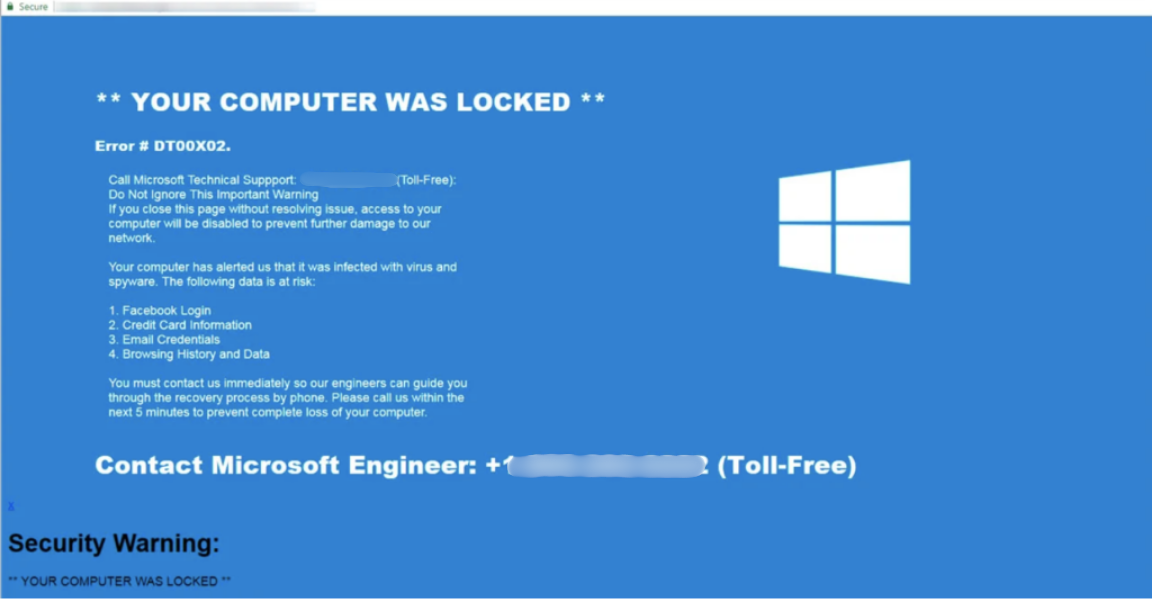
Pop-up virus warning scams use alarming full-screen browser alerts that mimic real Windows or Apple system warnings. The goal is to get you to call a number that connects directly to scammers posing as tech support.
In This Guide
- Overview of the Scam
- How the Scam Works
- Common Variations
- Example Scam Messages or Pop-Ups
- Warning Signs
- Who Scammers Often Target
- What the Scammer Is Trying to Achieve
- What To Do If You Encounter This Scam
- If You Already Paid or Shared Information
- How To Prevent Pop-Up Virus Warning Scams
- Final Safety Advice
Overview of the Scam
Pop-up virus warning scams use alarming browser alerts that fill your screen, play loud audio warnings, and display phone numbers to call for immediate help. They are designed to closely resemble genuine operating system alerts from Microsoft or Apple, complete with logos, official-sounding language, and the appearance of a system-level notification rather than a webpage.
The alerts are entirely fake. They appear on a webpage - not from your actual operating system - and have no ability to detect anything on your computer. Their only function is to frighten you into calling the phone number displayed, which connects to a scam operation posing as tech support.
Once you call, the scammer convinces you to give them remote access to your computer under the guise of diagnosing the infection. They then charge large fees for fake repair services, access your financial accounts, install real malware, or all of the above. This scam is closely related to the tech support scam and often the same operation runs both.
How the Scam Works
Pop-up virus warning scams use browser-based deception to create the appearance of a serious system emergency.
- You visit a website - often reached through a misleading ad, a search result, or a redirect from another page - that launches a full-screen browser alert. The alert uses Microsoft or Apple's branding, displays a "virus detected" or "your computer is blocked" message, and plays a loud audio warning or recorded voice telling you to call immediately.
- The alert is designed to make your browser appear frozen or unresponsive. It may repeatedly open new windows when you try to close it, making you feel trapped and reinforcing the sense of emergency. In some cases it tells you not to turn off your computer or you will lose your data.
- You call the phone number displayed. The person who answers claims to be a Microsoft or Apple support technician. They confirm the "serious infection" and ask to connect to your computer remotely using a legitimate remote access tool like AnyDesk or TeamViewer.
- Once connected, the scammer shows you "evidence" of the infection - typically by opening system tools that display confusing but normal technical information and misrepresenting it as proof of a serious problem. They quote a repair fee ranging from $150 to over $1,000.
- Payment is collected by gift card, wire transfer, or credit card. In more aggressive versions, the scammer also transfers money from your bank accounts while they have remote access to your computer, or installs real malware to maintain access after the call ends.
Common Variations
Pop-up virus warning scams take slightly different forms depending on the device and operating system being targeted.
- Windows-branded version: The alert mimics a Windows Security or Microsoft Defender notification. It uses Microsoft's color scheme and branding, and the phone number is presented as a "Microsoft Support" line.
- Apple-branded version: The alert mimics an Apple System Preferences or macOS security notification. It targets Mac users and presents the phone number as "Apple Support."
- Mobile version: On smartphones, a similar alert appears in the browser claiming your device is infected. It directs you to download an app or call a number. The app, if installed, may be malicious.
- Audio-only version: Some versions play a loud, looping audio message saying "Your computer has been blocked" or "Call Microsoft immediately" without a prominent visual. The audio is designed to startle and disorient, particularly if you are not expecting it.
- Browser lock version: The page uses JavaScript tricks to make it appear as though your browser cannot be closed. Pressing F11 to exit full screen mode, or force-quitting the browser through Task Manager, resolves this immediately.
Example Scam Messages or Pop-Ups
The example below shows what a pop-up virus warning scam alert typically looks like. The design intentionally resembles a real Windows or Apple security notification.
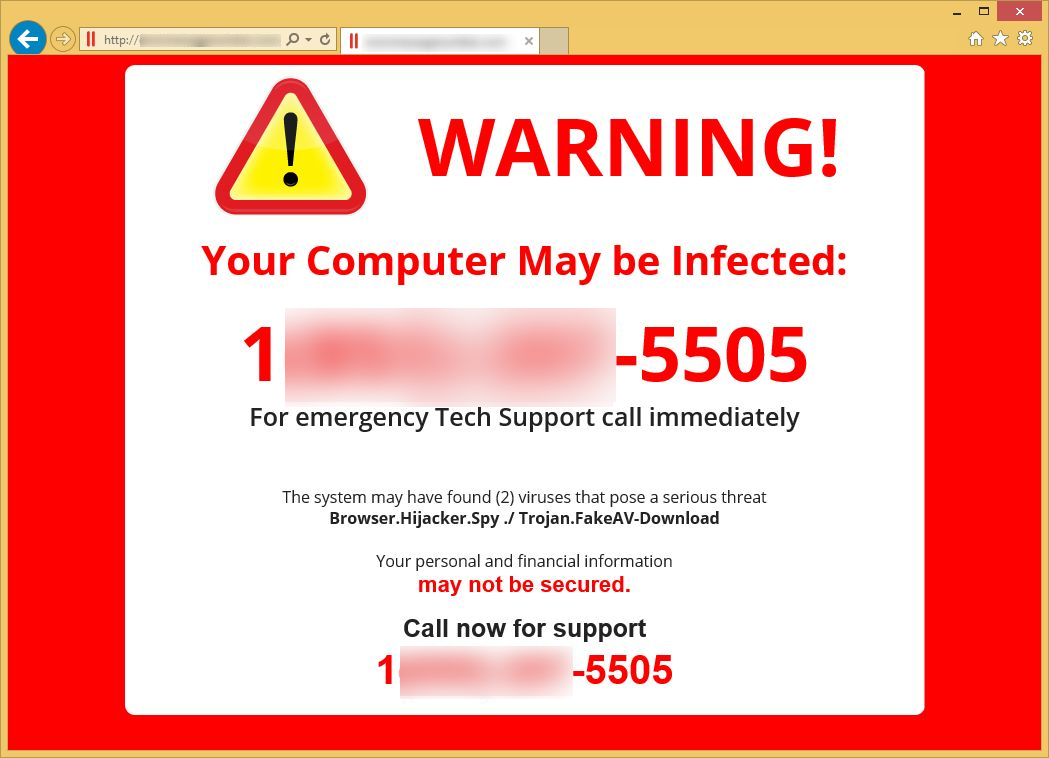
The alert uses Microsoft's visual branding, red color coding for urgency, and language that sounds like a genuine system message. The inclusion of a phone number is the definitive indicator that this is not a real Microsoft alert - Microsoft never includes support phone numbers in error messages or security warnings. The appearance of being "blocked" from normal computer use is a browser trick, not a real system restriction.
Common pop-up text includes: "MICROSOFT ALERT: Your computer has been blocked. Call Microsoft Support immediately at [number] to unlock your computer and remove the detected virus," and "APPLE SECURITY WARNING: Your Mac is infected with 3 viruses. Immediate action required. Call Apple Support at [number]. Do not restart your computer."
Warning Signs
These signals confirm that a virus warning or security alert is fraudulent.
- The alert appeared in your web browser rather than as an operating system notification outside of any browser window.
- The alert includes a phone number to call. Microsoft, Apple, and all legitimate technology companies do not include phone numbers in error messages or security warnings.
- The alert plays audio - a recorded voice, a siren sound, or a repetitive warning tone. Real system security alerts are silent text notifications.
- The browser appears to be frozen or prevents normal navigation. This is a JavaScript trick that can be overcome by force-quitting the browser.
- The alert claims your computer will be permanently damaged, your data will be lost, or you will face legal consequences if you close the window or turn off your computer.
- The message says your computer has been "blocked" by Microsoft, Apple, or law enforcement. Real companies and agencies do not block computers through browser pop-ups.
- The alert appeared while you were on an unfamiliar or low-quality website, or after clicking on an advertisement or link in an email.
Who Scammers Often Target
Pop-up virus warning scams reach anyone who browses websites that carry deceptive advertising, but they are most effective against people who are not familiar with the specific fact that browser content cannot generate real operating system alerts. If you know that a warning appearing in a browser window cannot be a genuine Windows or Mac system message, the scam falls apart immediately. Without that knowledge, a convincing-looking alert can appear entirely legitimate.
Older adults who are less experienced with computers are disproportionately affected. The alerts are frightening and feel like an emergency that requires immediate professional help - which is exactly the response the scammer is counting on.
What the Scammer Is Trying to Achieve
The pop-up alert itself is just the entry point. The real goal is achieved during the phone call and remote access session that follows. Scammers collect large fees for fake repair services, access bank accounts while connected to the victim's computer, install malware for ongoing access, and harvest stored passwords and personal information.
The combination of a frightening alert and a helpful-sounding technician is designed to move the victim from panic to trust quickly - creating a situation where they willingly grant full computer access to a stranger.
What To Do If You Encounter This Scam
If a pop-up virus warning appears on your screen, here is the correct response.
- Do not call the phone number. No matter how urgent or official the alert appears, the phone number leads to scammers, not to Microsoft or Apple.
- Close your browser. Press Escape first, then try closing the tab or window normally. If the browser appears locked, press F11 to exit full screen, or force-quit using Alt+F4 on Windows or Command+Q on Mac.
- If force-quitting does not work, use Task Manager on Windows (Ctrl+Shift+Esc) or Activity Monitor on Mac to end the browser process entirely.
- Once the browser is closed, run a scan with your real security software to confirm your device is clean. In most cases no actual infection occurred - the pop-up was purely a webpage-based scare tactic.
- Report the scam website to Google Safe Browsing at safebrowsing.google.com/safebrowsing/report_phish and to the FTC at ReportFraud.ftc.gov.
How To Prevent Pop-Up Virus Warning Scams
The single most protective piece of knowledge is the one described throughout this guide: browser pop-ups are never real security alerts, and Microsoft and Apple never include phone numbers in error messages.
- Remember that any virus warning appearing inside a web browser is fake. Real operating system alerts appear outside the browser entirely. This knowledge alone makes you immune to the entire category.
- Use a browser with built-in pop-up blocking - Chrome, Firefox, Safari, and Edge all have this enabled by default. Keep your browser updated.
- Install a reputable ad blocker. Many pop-up virus warning pages are reached through deceptive advertising networks, and an ad blocker prevents most of these ads from loading.
- Know how to force-quit your browser before you ever need to. Practicing this once on a normal day means you will be able to do it calmly if a fake warning appears in the future.
- Share this knowledge with family members who are less experienced with computers. Knowing that phone numbers in virus warnings are a scam indicator is one of the most practically useful pieces of computer safety information available.
Final Safety Advice
Pop-up virus warning scams are startling by design. A loud audio alert, a screen-filling warning, and a sense of being locked out of your computer are engineered to create immediate panic - the emotional state in which people are most likely to call the number and trust whoever answers.
The fact that dismantles the entire scam is this: what you are seeing is a webpage. It is content in a browser, not a message from your operating system. It has no ability to detect anything on your computer, no ability to lock your device, and no connection to Microsoft, Apple, or any real technology company. Closing the browser resolves the situation completely.
If you have already called the number and allowed remote access, act quickly - disconnect from the internet, contact your bank, and have your device examined. The sooner you take these steps, the less damage the access can cause.