
Fake Apple Support Scam
How fraudsters impersonate Apple to steal your account, your money, and your personal information
Scammers impersonate Apple through fake alerts, spoofed calls, and lookalike websites designed to make you believe your account or device is in serious danger.
In This Guide
- Overview of the Scam
- How the Scam Works
- Common Variations
- Example Scam Messages or Pop-Ups
- Warning Signs
- Who Scammers Often Target
- What the Scammer Is Trying to Achieve
- What To Do If You Encounter This Scam
- If You Already Paid or Shared Information
- How To Prevent Fake Apple Support Scams
- Final Safety Advice
Overview of the Scam
A fake Apple Support scam is a type of fraud in which someone pretends to be from Apple and contacts you with an urgent warning about your account, your device, or a suspicious purchase. The goal is to get you to hand over your Apple ID credentials, your payment information, or money directly.
Apple is one of the most recognized and trusted brands in the world, and scammers exploit that trust deliberately. When a message, call, or pop-up appears to come from Apple and tells you something is wrong, many people instinctively take it seriously. That instinct is exactly what these scams are designed to trigger.
Fake Apple Support scams are reported in high volumes year-round. They affect iPhone, iPad, and Mac users across all age groups, but older adults who may be less familiar with how Apple actually communicates are contacted most frequently and often face the greatest financial harm.
How the Scam Works
The scam typically begins with an unexpected alert, call, or message that appears to come directly from Apple. The approach follows a recognizable pattern once it starts.
- You receive a pop-up alert on your device, a phone call from a number that appears to be Apple's official support line, an email with Apple's logo and formatting, or a text message warning you about suspicious activity on your account. The message is designed to look completely authentic.
- The alert tells you something alarming: your Apple ID has been compromised, a purchase was made without your authorization, your iCloud account is about to be locked, or your device has been infected with a virus. The specific claim varies, but the purpose is always to create urgency and alarm.
- You are instructed to act immediately - call a number, click a link, or respond to the message. The urgency is deliberate. The scammer wants you to react before you have time to think or verify anything independently.
- If you call the number or engage with the message, you are connected to someone posing as an Apple Support agent. They speak professionally and may already know your name, your device type, or other details to appear legitimate.
- The fake agent walks you through steps to resolve the supposed problem. This typically involves giving them your Apple ID and password, entering a verification code, providing payment card details to reverse a charge or restore your account, or in some cases allowing them remote access to your device.
- Once they have your credentials or payment information, they use it to lock you out of your account, make purchases, drain linked payment methods, or sell your information to other fraudsters.
Apple does not call you without your request. It does not send unsolicited pop-up alerts asking you to call a number. And it will never ask for your Apple ID password, verification codes, or gift card payments over the phone.
Common Variations
Fake Apple Support scams arrive through several channels and take different forms depending on what the scammer is attempting to extract.
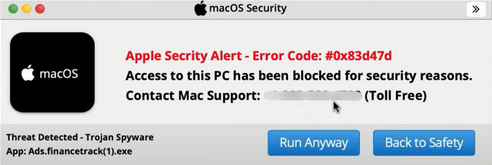
- Fake pop-up alerts: A browser window or on-screen notification appears claiming your device is infected or your Apple account is locked, with a phone number to call immediately. These pop-ups can appear on any device and are triggered by malicious websites or ads.
- Spoofed phone calls: A caller claims to be from Apple Support and says there has been suspicious activity on your account. The caller ID may display Apple's actual support number, which can be faked using widely available software.
- Phishing emails: You receive an email with Apple's branding that tells you your account has been suspended, a purchase has been flagged, or your payment information needs to be updated. The link leads to a fake Apple website designed to steal your login credentials.
- Fake receipt texts: A text message that looks like an Apple purchase confirmation arrives for a transaction you did not make, with a link to dispute it. The link goes to a site built to harvest your Apple ID and password.
- iCloud account lock threats: A message warns that your iCloud account will be permanently deleted unless you verify your identity within a short time window, pressuring you to act before thinking.
- Gift card demands: After gaining your trust, the fake agent tells you the fastest way to restore your account or reverse a fraudulent charge is to purchase Apple Gift Cards and provide the codes over the phone.
Example Scam Messages or Pop-Ups
The screenshot below is a real example of the type of communication used in fake Apple Support scams. These messages are constructed to closely mimic Apple's visual style and tone. Knowing what to look for makes them much easier to spot before any damage is done.
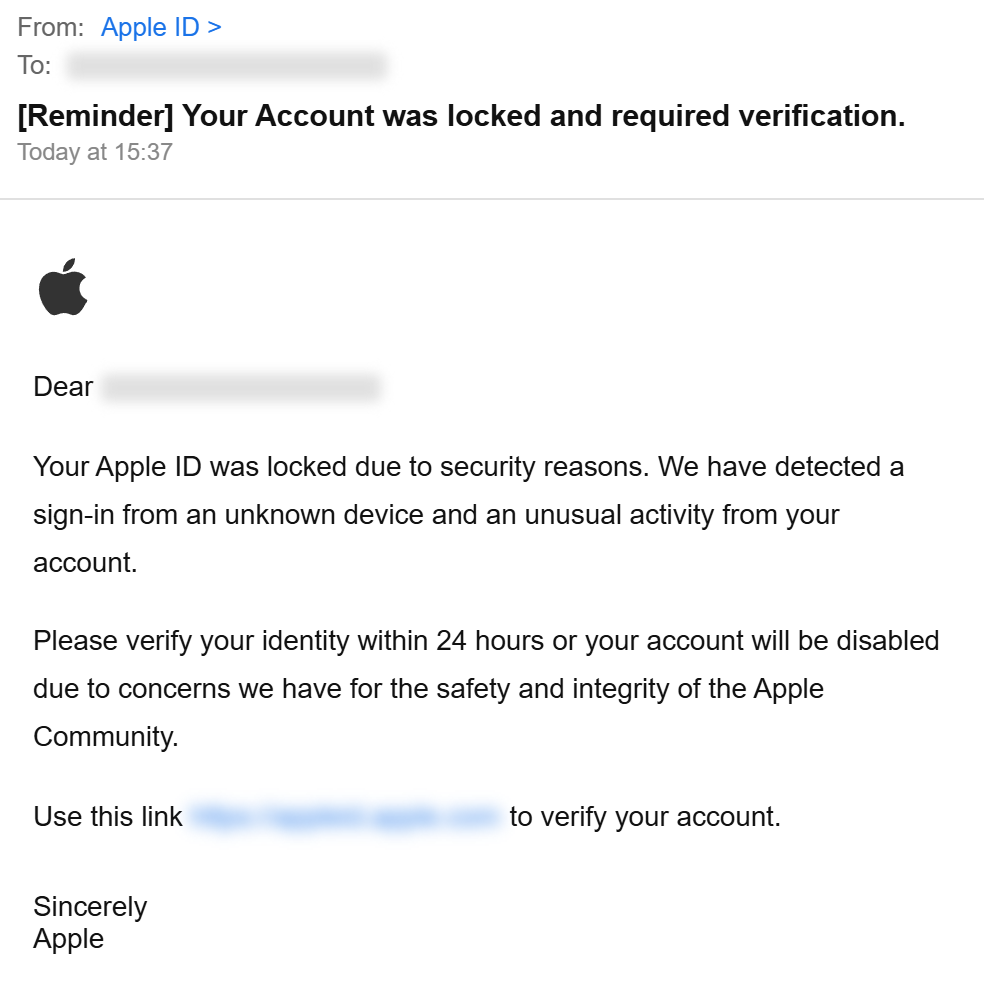
Notice the Apple logo, the urgent language about account suspension or unauthorized access, and the instruction to call or click immediately. Real Apple communications never pressure you to call a phone number from a pop-up or email. Verification codes, passwords, and gift card numbers are never requested by legitimate Apple Support agents.
Common phrases that appear in these scam messages include: your Apple ID has been disabled due to suspicious activity, an unauthorized purchase of $299 has been made on your account, your iCloud storage will be deleted in 24 hours unless you verify your account, call Apple Support immediately to protect your account, and your device has been compromised and needs to be secured now. These phrases are chosen to create panic and bypass careful thinking.
Warning Signs
The following signals are strong indicators that a message or call claiming to be from Apple is fraudulent.
- You receive an unexpected pop-up, call, or message from Apple that you did not initiate. Apple does not proactively call customers or send browser pop-ups asking you to take urgent action.
- The message creates extreme urgency - your account will be deleted, your device will be locked, or legal action will follow unless you act within minutes or hours.
- You are asked to call a phone number shown in a pop-up, email, or text. Apple's real support number is on apple.com, not embedded in unsolicited messages.
- A caller asks for your Apple ID password, one-time verification codes sent to your device, or your payment card details over the phone. Apple Support will never ask for these.
- You are told to purchase Apple Gift Cards to restore your account, reverse a charge, or pay for a security fix. No legitimate company uses gift cards as a payment or resolution method in this way.
- The email address the message came from does not end in @apple.com, or contains subtle misspellings like @apple-support.com or @appleservice.net.
- The caller asks you to share your screen, install an app, or allow remote access to your device to resolve the issue.
- The message says a large purchase was made on your account and provides a number to call to dispute it - this is a common hook to get you on the phone with a scammer.
Who Scammers Often Target
Fake Apple Support scams are cast broadly, but certain groups are contacted more frequently or face a higher risk of being drawn in.
Older adults who use Apple devices are among the most frequently targeted. Many are familiar with Apple products through iPhones and iPads but less familiar with how Apple actually handles account issues or support contacts. A message that looks official and sounds alarming carries real weight, and the pressure to act quickly makes it harder to pause and verify.
People who have recently made purchases through Apple - or who regularly use the App Store, Apple Pay, or iCloud - are also commonly targeted. Scammers know that a fake receipt for a real-seeming amount is more likely to be taken seriously by someone who regularly makes Apple purchases.
Anyone who has previously interacted with Apple Support is also at higher risk, since scammers sometimes obtain partial information from data breaches and use it to add credibility to their approach.
What the Scammer Is Trying to Achieve
The most common goal is access to your Apple ID. With your Apple ID and password, a scammer can lock you out of your own account, access photos and personal files stored in iCloud, make purchases using payment methods linked to your account, and in some cases access other accounts that share the same email address or password.
When the scam involves a fake purchase alert, the goal is usually your payment card information directly. The scammer presents themselves as helping you dispute a charge, and in the process of resolving it, collects the card details they actually wanted.
Gift card scams have a simpler goal: immediate, untraceable cash. Once you read the gift card code over the phone, those funds are gone and extraordinarily difficult to recover.
What To Do If You Encounter This Scam
If you receive an unexpected message, pop-up, or call claiming to be from Apple and demanding action, the following steps will help you respond safely.
- Do not call any phone number shown in the message or pop-up. Close the alert if possible. If a browser pop-up will not close, quit your browser entirely or restart your device.
- Do not click any links in emails or texts claiming to be from Apple. Instead, open a new browser window and go directly to apple.com or appleid.apple.com to check your actual account status.
- Do not share your Apple ID password, any verification codes sent to your device, or any payment card information with an unsolicited caller, even if they sound professional and claim to be from Apple.
- Do not purchase gift cards of any kind at the request of someone claiming to be Apple Support. This is never a legitimate resolution method.
- If you are concerned a purchase was genuinely made without your authorization, check your purchase history directly through the App Store or at reportaproblem.apple.com using your real Apple ID.
- Report the scam to Apple by forwarding suspicious emails to reportphishing@apple.com, and report the phone number or message to the FTC at ReportFraud.ftc.gov.
How To Prevent Fake Apple Support Scams
Prevention comes from understanding how Apple actually communicates and recognizing anything that falls outside that pattern.
- Know that Apple does not initiate unsolicited calls or send browser pop-ups asking you to call a support number. Any unexpected contact claiming to be Apple should be treated with immediate skepticism.
- Enable two-factor authentication on your Apple ID if you have not already. This significantly reduces the risk that someone who obtains your password can access your account without also having your physical device.
- Check your Apple ID account activity directly at appleid.apple.com any time you receive a concerning message about your account. Do not use links from the message itself.
- Understand that Apple will never ask for your password, verification codes, or gift card payments over the phone or via email. If any of these are requested, the contact is not from Apple.
- Be cautious about pop-up alerts that appear in your browser with phone numbers to call. Legitimate security warnings from Apple appear within your device's Settings app or as in-app notifications, not as browser pop-ups.
- Talk about these scams with family members who use Apple devices, particularly older relatives. Knowing that Apple never calls you out of the blue and never asks for gift cards makes these scams much easier to dismiss in the moment.
- Consider using a phone number lookup tool when you receive an unexpected call from a number claiming to be Apple Support, to quickly check whether that number has been flagged for scam activity.
Final Safety Advice
Apple has built one of the most trusted brands in the world, and scammers take full advantage of that trust. A message or call that looks and sounds like Apple can be genuinely difficult to dismiss in the moment, especially when it claims something urgent is happening to your account or your device.
The most important thing to remember is this: Apple does not call you without your request, and it does not send browser pop-ups asking you to call a number. If something appears to come from Apple and demands immediate action, the safest response is to close it and go directly to apple.com in a new window to check your account yourself. A few minutes spent doing that will either show you there is a real issue to address through proper channels or confirm that the message was a scam.
You are always allowed to slow down and verify. The urgency in these messages is manufactured. No real account problem will disappear in the five minutes it takes you to check things independently.
If you have been affected, change your Apple ID password, review your account, report what happened,
Report
Block Member?
Please confirm you want to block this member.
You will no longer be able to:
- Mention this member in posts
Please allow a few minutes for this process to complete.